Аргументи лишитись
Якщо ваші редактори продуктивні, швидкість сторінки прийнятна, а трафік зростає — мігрувати не потрібно. WordPress із налаштованим хостом, чистою темою та коротким списком плагінів швидший і дешевший, ніж більшість headless-сетапів, у яких опиняються люди.
Більшість розмов «нам треба на headless», у які ми входимо, насправді означають «наш WordPress — це хаос, і ніхто не хоче його лагодити». Чесний фікс зазвичай — кілька тижнів прибирання: відсікти плагіни, замінити page builder, переїхати на managed-хост, налаштувати білд-пайплайн. Ця робота часто становить 20% вартості міграції та повертає більшість розриву в продуктивності.
Міграція, яка вирішує проблему підтримки зміною архітектури, — це міграція, яка створює дорожчу проблему підтримки.
Аргументи рухатись
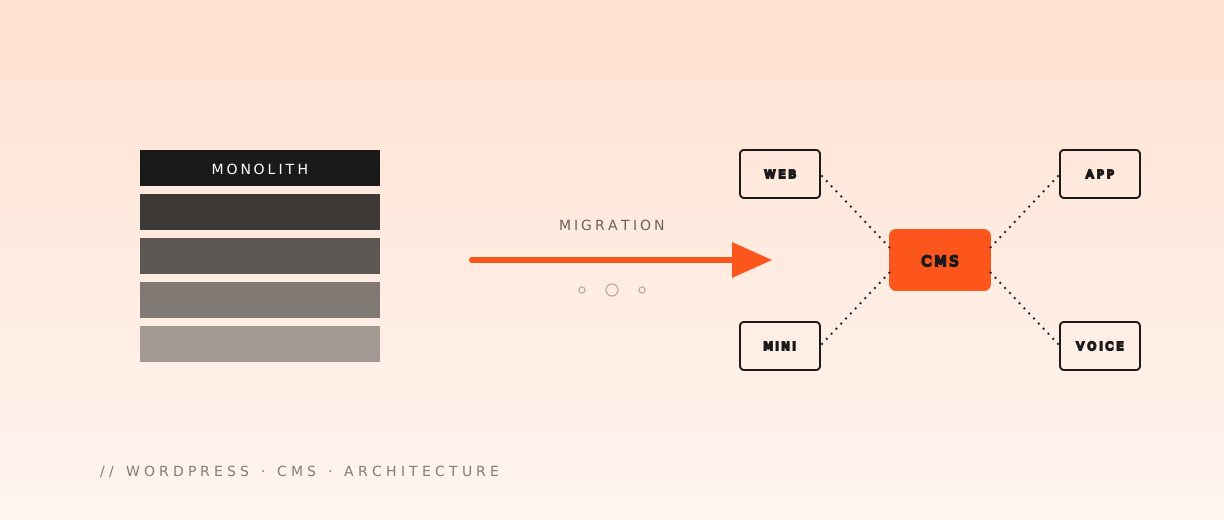
Ви не мігруєте «з WordPress». Ви мігруєте «до» двох речей: передбачувана продуктивність та редакторська свобода крізь поверхні. Той самий контент живить веб, мобільне, in-app та Mini App — без переписування тричі.
Конкретні причини, що тримаються:
- Стеля продуктивності. WordPress впирається в стіну на важких товарних сторінках. Headless-фронтенд на сучасній інфрі не має стелі, що мала б значення в масштабі маркетингового сайту.
- Контент для кількох поверхонь. Веб, мобільне, in-app, голос, кіоски. WordPress робився під один фронтенд; ви платите податок, щоб імітувати інші.
- Швидкість розробки. Сучасний React-toolchain, типобезпека, deploy-on-push. Команда виводить за дні, не тижні.
- Атак-surface. У headless-фронтенду нема
wp-login.php, який треба захищати. - Редактор на нових патернах. Компоненти, структурований контент, посилання між шматочками. Жоден із цих патернів не є рідним для блокового редактора WordPress.
Якщо у бізнесі два чи більше таких пункти, математика починає працювати. Одного зазвичай мало.
Матриця рішень
| Сигнал | Лишитись | Мігрувати |
|---|---|---|
| Редакторський флоу здоровий | ✓ | — |
| Швидкість сторінки — бюджетна стаття | — | ✓ |
| Кілька фронтендів споживають контент | — | ✓ |
| Плагіни знову розповзаються | — | ✓ |
| Один маркетинговий сайт, без roadmap | ✓ | — |
| Редакторів блокує тема | — | ✓ |
| Трафік стабільний, не вибуховий | ✓ | — |
| Інженери відходять через CMS | — | ✓ |
Три чи більше рядків зі сторони «Мігрувати» — реальний сигнал. Один-два зазвичай — знак, що менший фікс правильніший.
Що змінюється для редактора
Цю частину більшість планів міграції недооцінює. Редактори WordPress розпещені — і мають бути. Live-прев'ю, drag-and-drop блоки, пошук в адмінці, який реально працює, плагіни, що розв'язують проблему за пів дня. Headless-сетап усе це за замовчуванням віддає, і кожен шматок потрібно усвідомлено повернути.
- WYSIWYG-прев'ю складніше. Live-прев'ю потребує реального інженерного проходу — зазвичай draft-mode хук на фронтенді, що тягне неопубліковані дані з токеном.
- Робота із зображеннями переходить у пайплайн. Більше нема «завантажив і забув». CMS віддає URL, фронтенд трансформує. Редактору потрібні захисні рамки, щоб 5MB фото не зламало макет.
- Усвідомлення компонентів. Редактор має знати, для чого кожен блок. Schema-aware-поля, валідація та перевірки референсів — не опція, а сама міграція.
- Керування воркфлоу. Чернетки, заплановані публікації, права ролей, audit log. WordPress давав це безкоштовно. Більшість headless-CMS це має, але вимагає налаштування.
Жодне з цього не проблема, якщо ви це плануєте. Усе це проблема, якщо відкриваєте за тиждень до запуску.
Вибір CMS
Однієї правильної відповіді нема. Шортліст, який ми оцінюємо в умовному порядку придатності:
- Sanity. Найсильніший досвід редактора, найкраще для структурованого контенту з багатьма референсами. Real-time-співпраця працює.
- Contentful. Зрілий, ентерпрайз-френдлі, зрілі інтеграції. Прайс росте з трафіком.
- Strapi. Self-hosted, повний контроль, кастомізовний. Найкраще, коли є інженерна спроможність володіти інфрою.
- Payload. Code-first, TypeScript-native, володіє своєю БД. Чудово для команд, що хочуть CMS у своєму репозиторії.
- WordPress як headless. Лишити адмінку, користуватись REST або GraphQL API. Найменш ризикова міграція, якщо редактори люблять WordPress.
Обирайте за редакторським флоу вашої команди, не за чек-лістом фіч. Кожна CMS у списку технічно зробить роботу. Лише одна відчуватиметься правильно для редакторів, що користуються нею щодня.
Міграція у три фази
Команди, що намагаються перемкнути все одразу, зазвичай не перемикають нічого пів року. Поетапний підхід працює:
- Заморозити контент-модель. Зафіксувати типи постів, таксономії, кастомні поля та референси до того, як написано хоч рядок фронтенду. Це фаза найвищого ризику, яку більшість команд квапить.
- Спочатку переключити трафік читання. Виводити новий фронтенд проти старої WordPress-адмінки. Редактори далі працюють у WordPress, новий сайт читає дані. Клієнт за тижні бачить швидший сайт.
- Останнім переключити редактора. Лише після того, як новий фронтенд кілька тижнів стабільний у проді. Перенести контент, навчити редакторів, вимкнути WordPress-адмінку фінальним кроком.
У кожної фази є чіткий rollback. Якщо ламається друга — стара WordPress-вершина ще тут. Якщо ламається третя — можна тримати новий фронтенд на WordPress ще квартал, поки команда адаптується.
Що дешевшає, що дорожчає
Міграція — це перерозподіл витрат, не зменшення. Чесна бухгалтерія:
| Стає дешевше | Стає дорожче |
|---|---|
| Інженерія швидкості сторінок | Початковий сетап і моделювання |
| Безпекові патчі та плагінне пекло | Навчання редакторів новим інструментам |
| Додавання другого фронтенду | Live-прев'ю та draft mode |
| Перевикористання контенту командами | Хостинг і конфіг CDN |
| Швидкість інженерії за 6 місяців | Інженерне зусилля у місяці 1 |
Команда, що бюджетує лише виграші, не закінчить міграцію. Команда, що бюджетує обидва — виводить.
Коли не мігрувати — ніколи
Є категорія WordPress-сайтів, де міграція — неправильний вибір незалежно. Патерн:
- Маркетинговий сайт із зрілими редакторськими процесами.
- Маленька команда, де редактори та інженери — одні й ті самі люди.
- Рівень трафіку, де WordPress комфортно віддає з кешу.
- Бізнес, де контент — не конкурентна поверхня.
Для них чистий WordPress — найкращий інструмент. Інвестиція — у кеш-шар, хост і дисципліновану плагінну політику, не в новий стек.
Що ми виводимо в перший місяць
Коли команда замовляє міграцію в нас, перший місяць виглядає однаково в більшості енгейджментів:
- Контент-аудит. Кожен тип постів, кожне поле, кожен плагін. Що лишається, що зливається, що зникає.
- Заморозка моделі. Документовану контент-модель, яку підписують і редактори, і інженери.
- Робочий фронтенд проти старого WordPress. Готовий до прода, за feature flag.
- Draft-mode-прев'ю, яким редактори реально користуються.
- Rollback-план, який протестовано.
Якщо місяць 1 закінчується без цих п'яти — міграція не безпечна, щоб іти далі. Команди, які потрапляють у ці маркери, закінчують за 3-4 місяці. Команди, що їх пропускають, досі на місяці 9.
Чесний підсумок
Headless — не срібна куля. Це усвідомлений трейд: операційна складність в обмін на продуктивність і гнучкість. Зробіть цей трейд з обома відкритими очима, у тому порядку, який реально потрібен проєкту, і результат — стек, з якого команда виводить роками. Зробіть це тому, що хтось у команді читав тред у Twitter, і ви знову мігруватимете через вісімнадцять місяців.
 Схожі статті